
Original image is Rise by Adorkastock.
Project Concept
I wanted to explore filters and image-processing through python, in the interest of applying a given filter to mutliple images in bulk. I've experimented with HSV color shifts and pixel/image manipulation in the past (notably here), but my favorite filters have always been posterize and dither filters for their "retro" stylized quality. In this project, I wanted to generate a "pop-art" style image, using the PILLOW library for the image manipulation and MatPlotLib to easily arrange multiple images in a Warhol-style grid pattern.
Code Samples

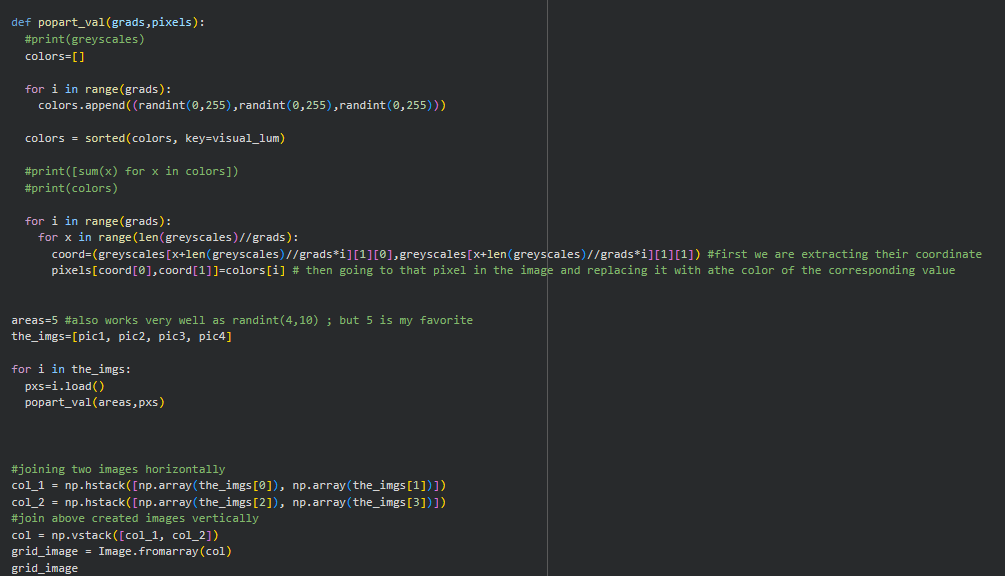
The above code is a relatively uncommented (save for my own sake's) earlier prototype of the project. My current aim is to clean it up for easier use by other people with clearer step-by-step explanations, as well as a more intuitive function structure. (As here, that version is very dependent on execution order, as well as modification done directly to the code rather than a clearly defined field for input filepaths or other such quality-of-life user-forward changes).
That being said, my intent for this first draft was functionality, which it delivers very statisfyingly on. Onwards to User Experience and Documentation!
The practical aim here for implementation was to have the program "python_popart.py" process all images within the "Inputs" folder, and save their pop-art version to the "Outputs" folder. That way, all a user has to do is fill up the Inputs folder, run the code, and reap from the Outputs.

I ended up creating two image-processing functions, one which takes a list of images and iterates through each to create its pop-art counterpart, and one that takes a single image and does not downsize it in case the goal is to apply the filter to a single photo while preserving resolution.
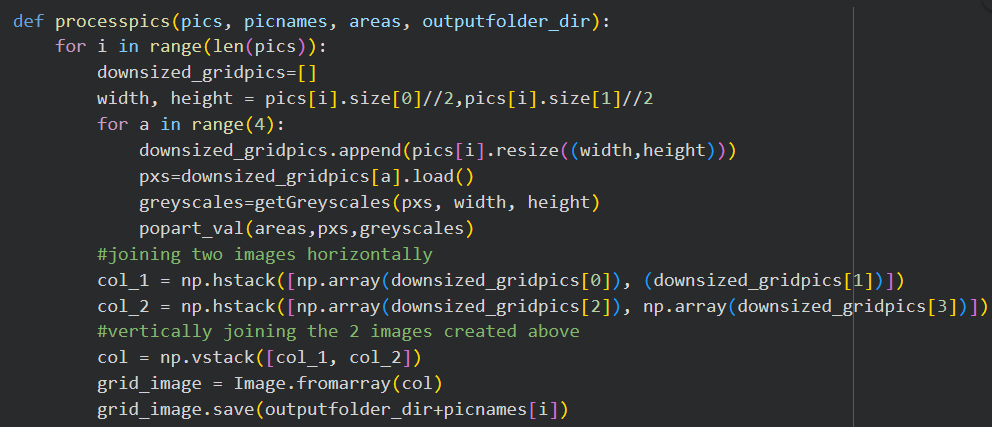

And below are the contents, respectively, of each of the two directories "/Inputs/*.*" and "Outputs/*.*" after running the code below.

Here, we iterate through the "Inputs/" directory, save those images within the "mypictures" list, and call the processpics() function on them.

Contents of the "Inputs" folder.

Contents of the "Outputs" folder after running the program (not including processOnePic).
I do really like that this program is pretty much filetype-agnostic, so long as we are dealing with images. In the future, I would love to come back and clean up the program so that it handles exceptions a bit better, perhaps by printing out the name of the problematic file should it encounter something it can't open with PIL, without throwing an error and stopping entirely. For now though, it remains extremely easy (and fun!) to use, provided you feed it relatively clean data.